Effects & Runtime
How the included effects fit into the Simple and Advanced workflows, plus projector and performance notes.Overview
Wireframe FX Studio includes 2 Material wireframe effects and 5 Compute Shader wireframe effects.
Material effects are designed for fast visual styling in the Simple and Advanced workflows.
Compute Shader effects are designed for the Advanced workflow and add animated, GPU-driven wireframe behavior.
Use these effects for technical visualization, scans, hologram-style visuals, topology inspection, animated reveals, digital faults, force-field motion, and stylized runtime presentations.
Workflow Compatibility
Material Effects
- Simple: supported
- Advanced: supported
- Texture Overlay: not used
- Post Processing: not used
Compute Shader Effects
- Simple: not used
- Advanced: supported
- Texture Overlay: not used
- Post Processing: not used
Material Effects
Reveal Effect
Reveal Effect creates an animated wireframe reveal that can be used for object loading, hologram activation, scan passes, and stylized technical presentation.
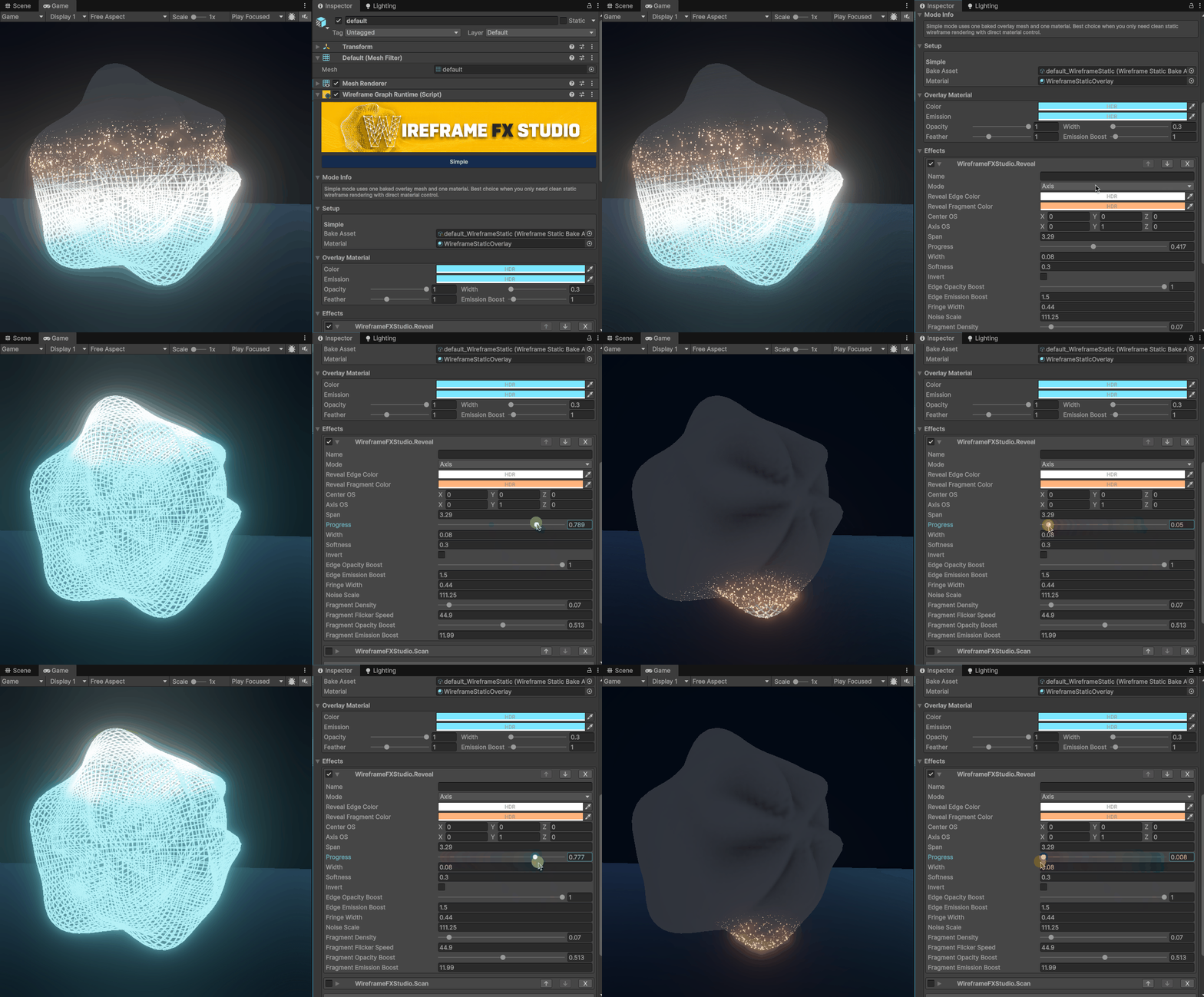
Material-based reveal effect for animated wireframe visibility and stylized object activation.
Scan Effect
Scan Effect creates a moving scan treatment across the wireframe surface.
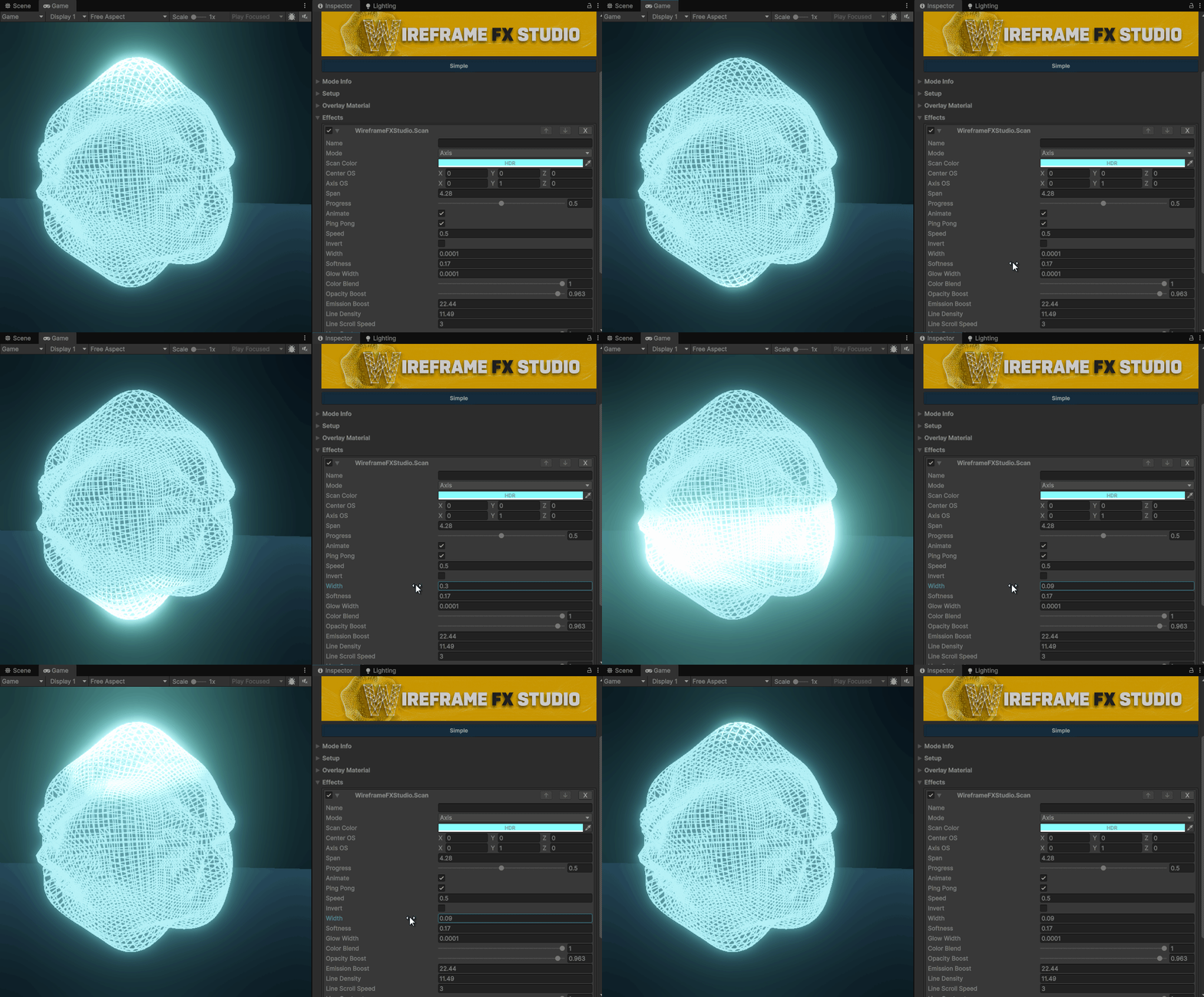
Material-based scan effect for animated wireframe highlights and scan-style motion.
Compute Shader Effects
Compute Shader effects are available in the Advanced workflow.
They can modify wireframe visibility, color, opacity, thickness, emission, and vertex offsets depending on the selected effect and mode.
Structure Map
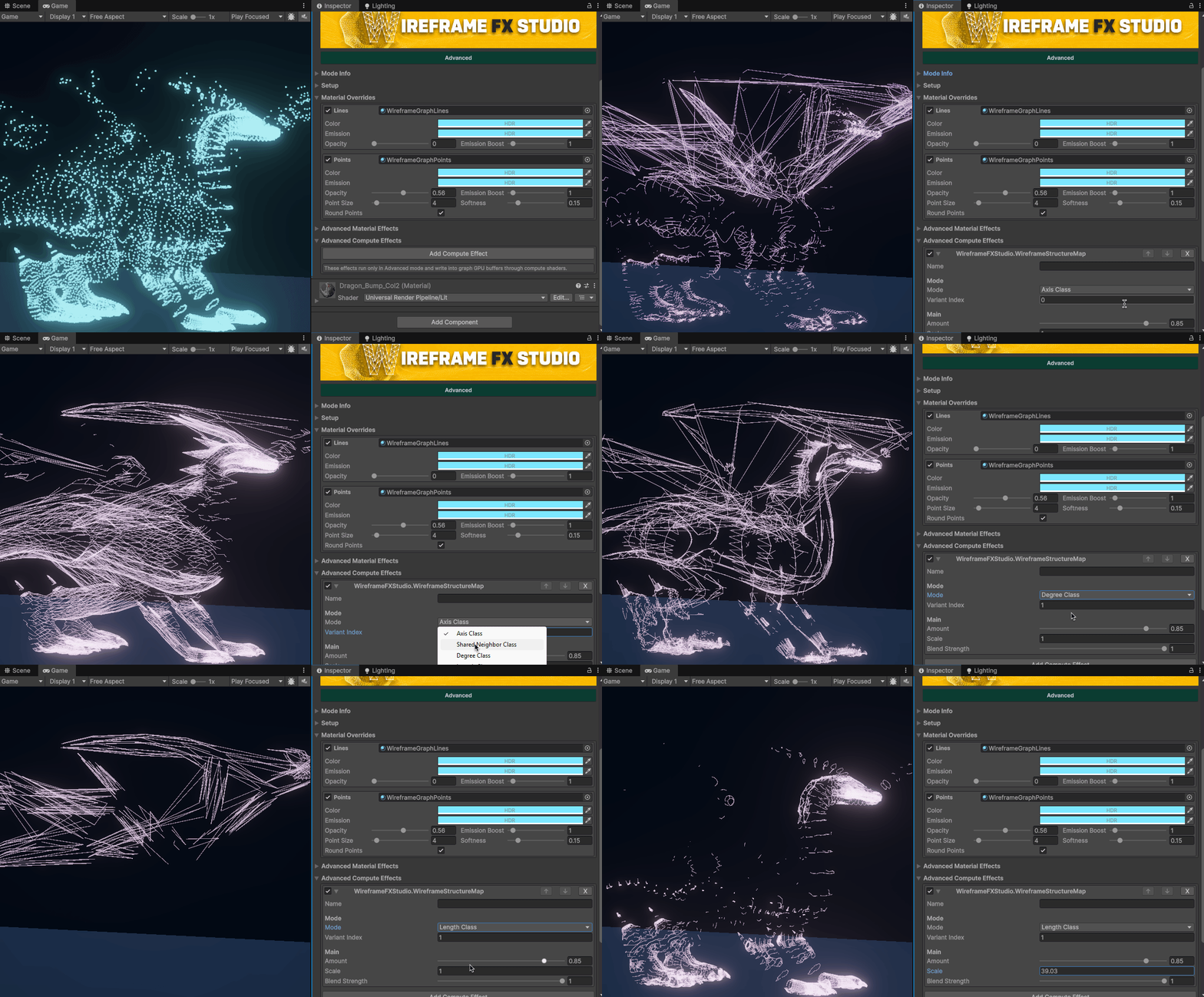
**Structure Map ** classifies wireframe edges into structural groups.
It separates edges by axis direction, shared neighbors, vertex connectivity, and edge length, making it useful for topology inspection, mesh analysis, and stylized structure-map visuals.
Modes
- Axis Direction — Groups edges by their main direction in object space.
- Shared Neighbors — Groups edges by how many neighboring vertices they share.
- Vertex Degree — Groups edges by the average connectivity of their two endpoints.
- Edge Length — Groups edges by length.
Parameters
- Variant Index — Selects one of the detected structure groups inside the current mode.
- Amount — Controls how strongly the selected group is isolated from the rest of the wireframe.
- Scale — Controls the length classification range in Edge Length mode.
- Blend Strength — Controls how strongly this effect blends with other active wireframe effects.
Digital Faults
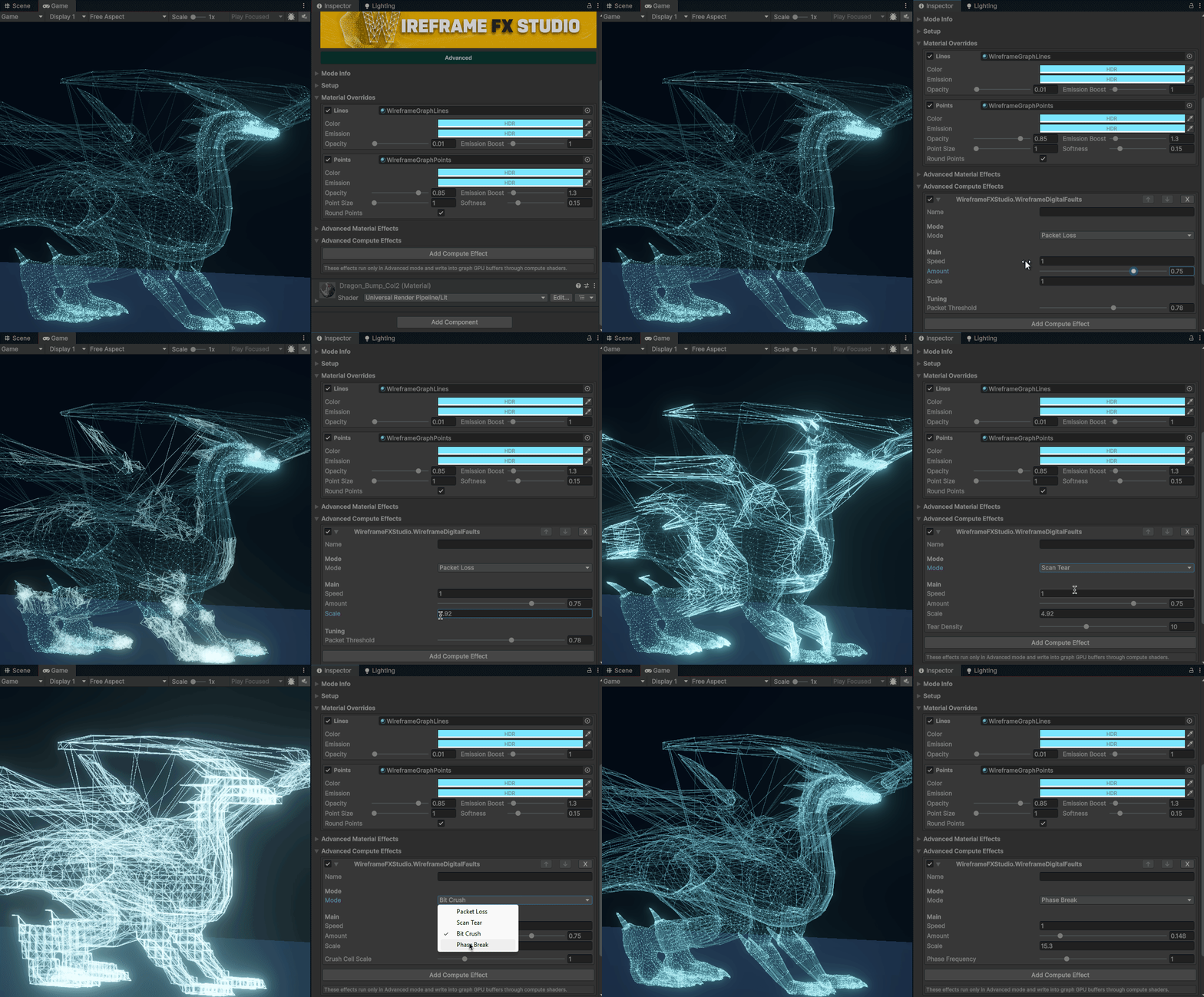
**Digital Faults ** adds animated digital failure effects to wireframe meshes.
It can create edge dropouts, scan tearing, vertex displacement, pixel-crushed deformation, color shifts, opacity changes, and emission boosts.
Modes
- Packet Loss — Randomly hides and flickers wireframe edges in animated cell regions.
- Scan Tear — Creates moving horizontal tear bands across the mesh.
- Bit Crush — Snaps vertex positions into blocky spatial cells.
- Phase Break — Applies animated phase-based displacement and color/emission changes.
Parameters
- Speed — Controls the animation speed.
- Amount — Controls the overall effect strength.
- Scale — Controls the size and frequency of the generated fault regions.
- Packet Threshold — Controls how many regions are affected in Packet Loss mode. Higher values create fewer active dropout areas.
- Tear Density — Controls the number and spacing of tear bands in Scan Tear mode.
- Crush Cell Scale — Controls the cell size used for position snapping in Bit Crush mode. Higher values create larger blocky deformation cells.
- Phase Frequency — Controls the frequency of the animated phase distortion in Phase Break mode.
- Blend Strength — Controls how strongly this effect blends with other active wireframe effects.
Bio Sync
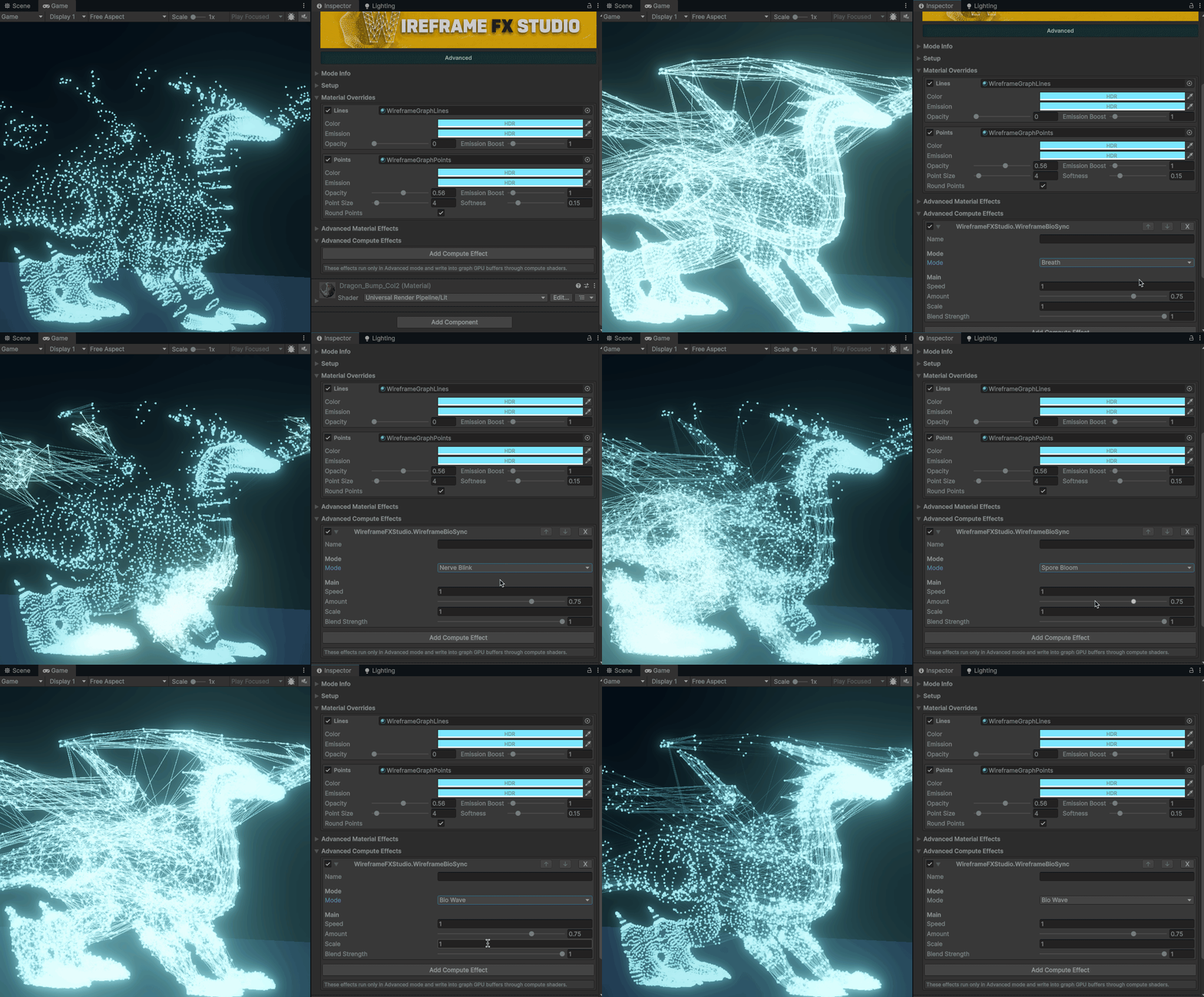
**Bio Sync ** adds organic animated motion to wireframe meshes.
It creates breathing pulses, nerve-like flashes, spore-style bursts, and flowing biological waves by modifying vertex offsets, edge color, opacity, thickness, and emission.
Modes
- Breath — Creates a rhythmic expansion effect across the mesh.
- Nerve Blink — Creates fast directional blink bands with random spark activity.
- Spore Bloom — Creates localized animated bloom regions across the mesh surface.
- Bio Wave — Creates a flowing vertical wave pattern across the mesh.
Parameters
- Speed — Controls the animation speed.
- Amount — Controls the overall effect strength.
- Scale — Controls the size and frequency of the generated biological patterns.
- Blend Strength — Controls how strongly this effect blends with other active wireframe effects.
Magnetic Field
Magnetic Field adds force-field style motion to wireframe meshes.
It pushes, pulls, twists, or rotates wireframe vertices around the mesh center, while also changing edge color, opacity, thickness, and emission.
Modes
- Attract — Pulls wireframe vertices toward the center.
- Repel — Pushes wireframe vertices away from the center.
- Twist — Moves vertices around the center using a twisting tangent motion.
- Vortex — Combines inward pull with circular motion.
- Orbit — Creates animated orbital movement with randomized local variation.
- Field Surge — Creates a moving radial surge across the mesh.
Parameters
- Speed — Controls the animation speed.
- Amount — Controls the overall force strength.
- Radius — Controls the area affected by the field.
- Blend Strength — Controls how strongly this effect blends with other active wireframe effects.
Edge Loop Families
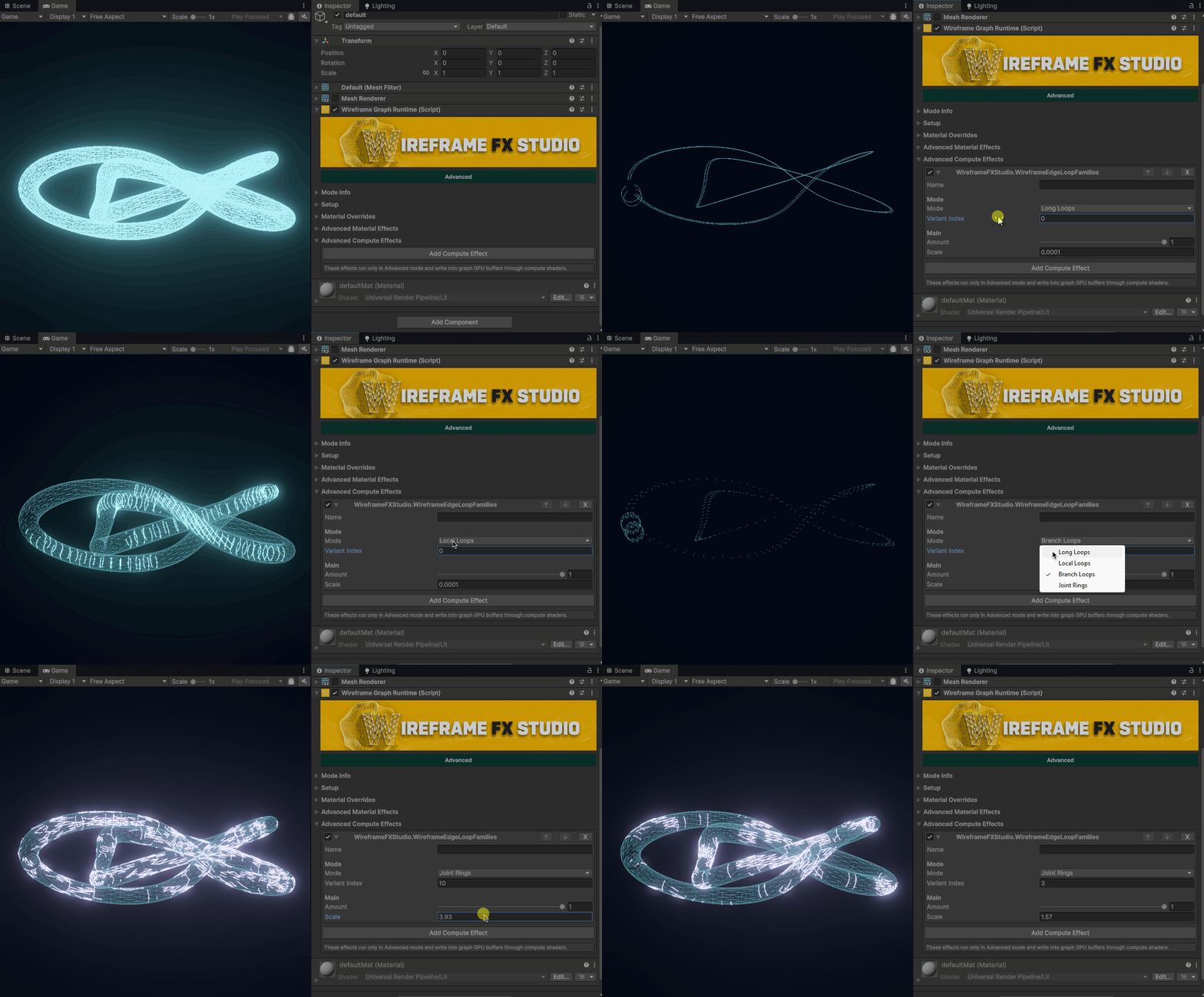
Edge Loop Families detects and highlights different edge-loop families on a mesh.
It separates wireframe edges by flow, direction, branching, and connectivity, allowing you to isolate specific topology patterns.
Modes
- Long Loops — Highlights long continuous edge flows.
- Local Loops — Highlights shorter local loop groups.
- Branch Loops — Highlights edges where the flow splits, breaks, or changes direction.
- Joint Rings — Highlights dense connection areas where multiple edge paths meet.
Parameters
- Variant Index — Selects one of the generated loop-family variants.
- Amount — Controls how strongly the selected loop family is isolated from the rest of the wireframe.
- Scale — Controls the size and density of detected loop-family regions.
Skinned Mesh Support
Compute Shader effects can evaluate animated or deformed vertex positions, so they work with both static meshes and skinned meshes.
This makes the effect stack useful for:
- static props
- environment pieces
- animated characters
- technical presentation scenes
- runtime object highlights
Projector Support
Wireframe FX Studio includes projector modes for stylized and technical visuals.
Use projector workflows when the wireframe should behave like a projected treatment instead of a simple object overlay.
Projector modes are useful for:
- scan zones
- hologram reveals
- localized highlights
- technical object analysis
- scene-driven presentation effects
Performance Notes
Wireframe FX Studio is designed for high performance and efficient GPU execution.
The final cost depends on the selected workflow, mesh complexity, active effects, and how many effects are combined at runtime.
Recommended workflow:
- Confirm the base wireframe result first.
- Add one effect at a time.
- Use material effects when you only need simple styling.
- Use compute effects when you need advanced animated behavior.
- Keep the active effect stack as focused as possible.